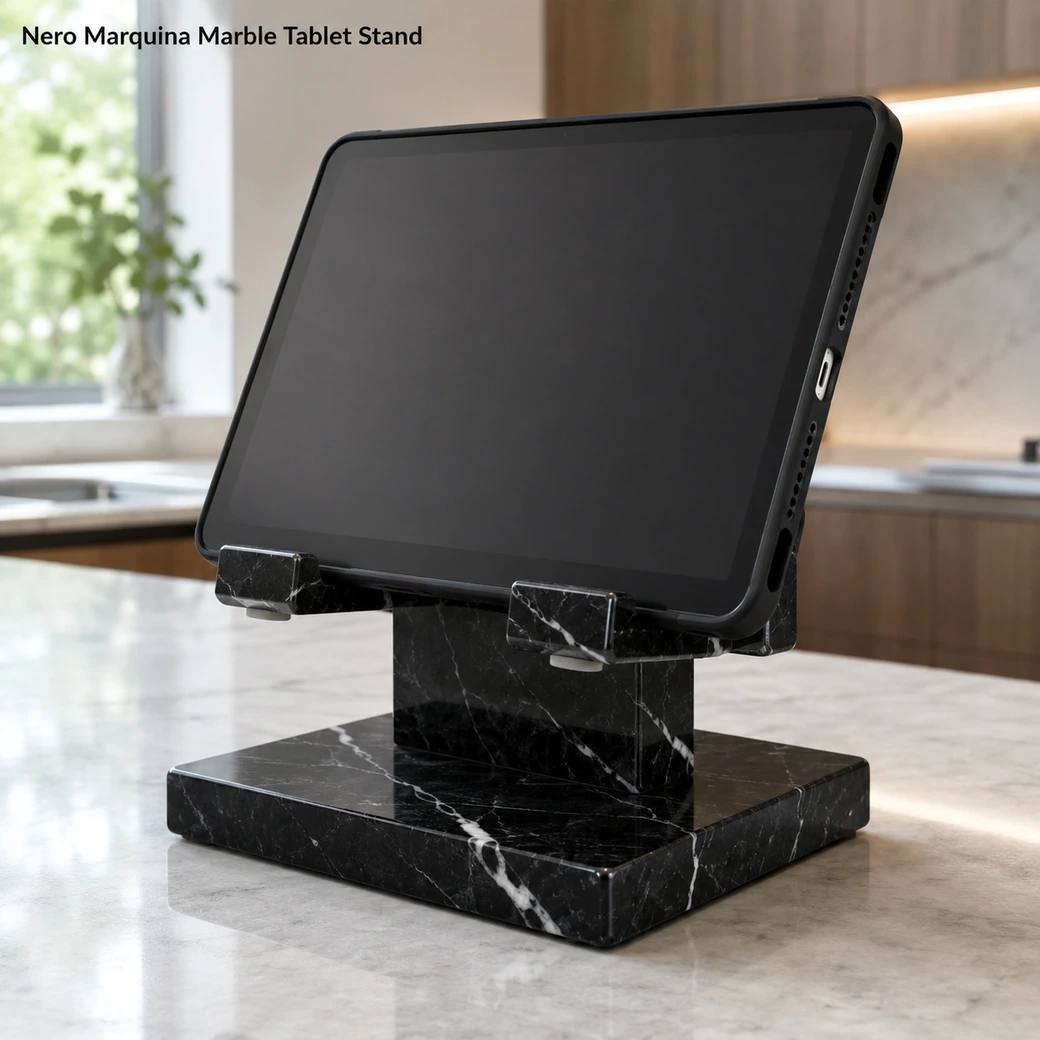
A tablet stand or iPad desktop stand should match the tablet’s width, support both viewing orientations and leave access to the charging port. The weighted base gives an iPad stand UAE or iPad stand Dubai setup good stability for recipes, calls or media viewing; a moderate viewing angle reduces neck bending. Clean the stand with a soft cloth and protect the device with felt or silicone at contact points.
Stable Viewing & Charging Support
Marble Tablet Stand Small
Secure product inquiry
Buy now
Cash on delivery available. Product details are pre-filled below. Owner delivery adds AED 5,000.
Cookbook, Charging & Device Display
Viewing Angle, Device Fit and Charging Access
Tablet support should combine a comfortable viewing angle with an unobstructed charging path. A carved cable gap allows an iPad or similar device to remain connected while resting on the stand, and a weighty 3.2 kg stone base reduces movement during touchscreen use. The same angled support can hold a cookbook for recipe viewing, provided the ledge is deep enough for the book without covering too much of the page.
Device Fit
Choosing the Right Marble iPad Stand
Measure the tablet with its everyday case fitted, because case thickness can determine whether the support groove is actually usable. The holder should be wide and stable enough for landscape viewing while retaining the tablet securely in portrait mode, with neither orientation obstructing the charging connection or important controls.
Viewing Formats
Nero Marquina Tablet Holder Configurations
Recipe use benefits from an upright, wipe-friendly kitchen viewing angle, while reading is usually more comfortable at a moderate recline. Video calls need the front camera positioned more vertically, and desk-display or streaming use can sit farther back; the most flexible holder supports these tasks without compromising device stability or charging access.
Cookbook Stand Device Compatibility
Slot width should match the tablet thickness while the 18 × 12 cm support area provides enough contact to hold portrait or landscape viewing securely.
Stone Device Stand Cable Clearance
Position the charging channel directly in line with the device port and leave enough bend clearance so the cable is not sharply compressed against the stone.
Black Limestone Tablet Contact Pads
Felt or silicone should line every device-contact point so the tablet never rubs directly against the polished Nero Marquina surface.
Product Data
Jet Black iPad Pedestal Details
This small iPad pedestal uses Nero Marquina, identified as fine-grained limestone, with a jet-black field, crisp white veining and polished finish. Its 18 × 12 × 18 cm format weighs 3.2 kg, giving the tablet stand a compact yet substantial desktop footprint.
| Viewing Angle Degrees | 60° primary viewing angle |
|---|---|
| Case Thickness Allowance | Up to 15 mm device-plus-case thickness allowance |
| Front Lip Height | 18 mm-high front lip with 12 mm usable device-retention depth |
| Cable Channel Width | 12 mm-wide × 8 mm-deep charging-cable channel |
| Device Contact Area | 40 mm-high silicone-lined lower contact zone supporting the device without covering the screen |
| Camera Clearance | Camera opening provides clearance for modules up to 45 × 45 mm in portrait or landscape position |
| Speaker Clearance | Minimum 20 × 8 mm lower speaker opening in both portrait and landscape positions |
| Base Pad Type | Full-coverage 2 mm-thick microsuction silicone base pad |
| One-Hand Docking Space | Minimum 25 mm clear side access for one-handed docking and removal |
| Edge Radius | R4 mm radius on exposed stone edges and device-contact corners |
Made to Order
Custom Marble Charging Stand Options
A custom marble charging stand can be cut for the exact tablet thickness, case size and preferred viewing angle. The charging channel, speaker openings and base footprint can be repositioned for portrait or landscape docking without weakening the front retaining ledge.
Key Benefits
Why Choose This Kitchen Tablet Stand
A kitchen tablet stand provides stable hands-free viewing for recipes, calls or media while keeping the device upright and off the work surface. Nero Marquina gives the base useful weight, while felt or silicone at contact points helps protect the tablet from hard stone edges. The cradle should also leave charging access available and support the required viewing orientation.
- Portrait Landscape Support
The Nero Marquina support accommodates portrait or landscape positioning so recipes, calls and media remain comfortably viewable hands-free.
- 3.2 kg Stability
The 3.2 kg Nero Marquina body keeps a tablet steady during portrait or landscape viewing, tapping and charging.
- Charging Cable Access
A cable opening or open lower edge keeps the charging connection accessible while the tablet remains supported for viewing.
- Custom Device Fit
Cradle width, viewing angle and contact points can be fabricated around the exact tablet and case dimensions for a secure portrait or landscape fit.
Purchase Guidance
Before Ordering a Natural Stone Tablet Stand
Before ordering a Nero Marquina tablet stand, measure the device with its regular case fitted so the cradle supports the actual thickness and width rather than a nominal tablet size. Specify the preferred viewing angle and charging-port position so the cable can remain connected without forcing the device forward; other stone applications such as outdoor travertine tile similarly depend on selecting dimensions and finishes for their intended environment.

Specification Reference
Nero Marquina Tablet Stand Technical Specifications
Use the specification table to verify the 18 × 12 × 18 cm dimensions and 3.2 kg weight together with slot width, viewing angle, charging-cable access and device-case compatibility so you can confirm that your tablet fits securely in both portrait and landscape use.
Product details
Specifications, care, delivery and FAQ
Everything is rendered from product JSON fields so the page remains SEO-ready even before JavaScript runs.
Cleaning: Remove and unplug the tablet, dust polished Nero Marquina and charging openings with microfiber, wipe the stone using a barely damp pH-neutral cleaner and buff dry, clean felt or silicone device pads separately and replace them if gritty, avoid alcohol overspray acids abrasives and moisture near electronics
Daily Care: Dust polished Nero Marquina and charging access daily, wipe with a barely damp microfiber cloth, keep felt or silicone device contacts clean and grit-free, prevent liquid near electronics, avoid acids abrasives and sliding the tablet
- Avoid direct tablet contact with unpadded stone
- avoid blocking the charging port
- avoid forcing an oversized device into the cradle
- avoid liquid near electronics
- avoid acidic or abrasive cleaners on polished Nero Marquina
Maintenance: Dust polished Nero Marquina and the charging opening, wipe with microfiber and pH-neutral cleaner, keep felt or silicone device contacts clean, replace padding if gritty or compressed, confirm portrait and landscape stability, maintain charging-port clearance, keep liquids away from electronics
Handling: Remove and unplug the tablet before moving the 3.2 kg stand, lift the stone base with both hands, place the device gently on felt or silicone padding, keep charging access unobstructed, verify orientation stability, never carry it with the tablet installed
How wide should the slot of a marble tablet stand be to accommodate tablets both with and without protective cases while still keeping the device stable?
Measure the tablet’s thickness with its largest case and add approximately 2–3 mm; slim tablets may fit a 10–12 mm slot, standard cases often need 14–18 mm and rugged cases can require over 20 mm. A stepped or lined slot accommodates both cased and uncased devices more securely than one uniformly wide opening.
Will this stand hold the tablet securely in both portrait and landscape positions without covering the screen, buttons or charging port?
Both orientations are possible when the ledge supports the tablet’s full lower edge and the stand remains stable with its widest cased configuration. The retaining lip must not cover navigation areas, while a centred cable opening and unobstructed side controls allow charging and adjustment in portrait or landscape mode.
What viewing angle works best for following recipes, joining video calls and watching media without excessive screen glare or uncomfortable neck bending?
A viewing angle around 55–65 degrees works well for standing recipe use, while 65–75 degrees is more comfortable for seated video calls and media. An adjustable range of roughly 55–75 degrees is ideal for controlling glare and reducing neck bending in different positions.
Is there enough charging-cable clearance beneath the docked tablet in both portrait and landscape positions without sharply bending or trapping the connector?
Adequate clearance cannot be confirmed from the 18 × 12 × 18 cm exterior dimensions alone; the ledge needs a centred opening wide enough for the complete connector head and at least 25–35 mm of free space below it. A right-angle cable may need less vertical clearance, but both portrait and landscape positions should be tested with the actual tablet, case and charging plug so the cable maintains a gentle bend rather than supporting the device’s weight.
Should non-staining silicone or felt padding be installed along the ledge and backrest to protect a tablet while preventing it from slipping on polished Nero Marquina?
Non-staining silicone is preferable because it protects the tablet while providing better grip and moisture resistance than felt. Install thin neutral strips on the ledge and rear support, keeping camera, speakers and charging port unobstructed; felt can be used in dry settings but should be replaceable because it traps dust.
Reviews
Reviews and new review submission
0.0 average rating from 0 reviews. New reviews are saved as pending until approved.
No approved reviews yet for this product. The review form is ready for buyer submissions.