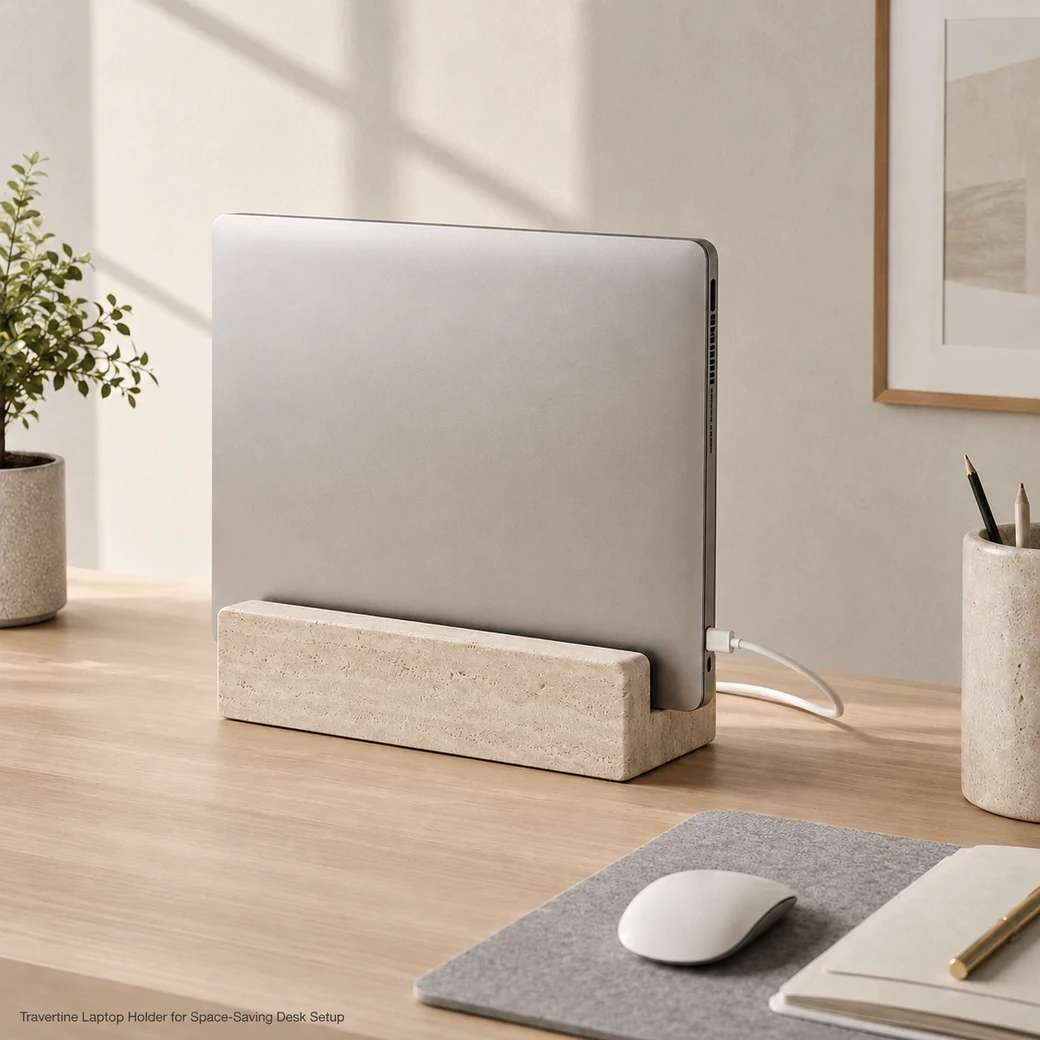
A laptop holder stand in stone is most useful as a stable desktop dock for an upright laptop or closed MacBook rather than a lightweight portable riser. The slot should be cut to the device thickness including any case, with a protective lining preventing direct stone-to-device contact. An upright laptop holder frees desk space, while ventilation remains unobstructed when the computer is docked as intended; dust the stone with a soft cloth and keep liquids away from electronics.
Vertical Laptop Storage Guide
Marble Laptop Holder Small
Secure product inquiry
Buy now
Cash on delivery available. Product details are pre-filled below. Owner delivery adds AED 5,000.
Minimal Desktop Docking
Slot Sizing for a Cleaner Desktop
The 22 × 8 × 5 cm footprint is suited to a vertical desktop dock that stores a closed laptop rather than a broad angled working riser. Slot width should be matched to the actual closed thickness of a MacBook or other device, and felt lining, cable access and sufficient ventilation clearance are more important than simply specifying “universal” compatibility.
Buyer Fit
Choosing the Right Marble Laptop Stand
This 22 × 8 × 5 cm Travertine piece is intended primarily as a vertical laptop dock rather than an angled working riser. In vertical docking use, a closed laptop or MacBook sits upright inside a fitted slot, reducing the desk area occupied by the device when connected to an external monitor or stored between sessions. An angled working riser performs a different function by supporting an open laptop screen and keyboard at an elevated viewing angle. Because this stone holder has a compact, narrow footprint, compatibility should be judged by slot width and device thickness rather than by the dimensions normally associated with an open-laptop stand.
Format Options
Marble Laptop Dock Formats for Daily Use
A single-slot dock stores one closed laptop upright and frees desk space, while dual-device versions widen the base to separate two laptops or a laptop and tablet. Angled desktop holders shift from storage toward active viewing, supporting the screen at a fixed incline while maintaining enough clearance for ventilation and cables.
Marble MacBook Holder Size and Compatibility
The 22 × 8 × 5 cm dock should be cut to the laptop’s actual closed thickness plus any case allowance, leaving slight lined clearance for easy insertion and removal.
Vertical Marble Laptop Stand Stability and Support
The 1.28 kg stone base stabilizes an upright laptop, while soft slot lining protects the device and an open route keeps charging cables accessible.
Marble Laptop Table Finish and Material Behaviour
The classic-honed travertine should contact the device only through soft lining, while dust is best removed dry so moisture stays away from electronics.
Product Data
Marble Laptop Desk Product Details
This small Marble Laptop Desk holder is fabricated from Classic Beige Travertine in a Light Beige Travertine grade, finished in a Classic Honed surface with a Light Sand Beige appearance. Measuring 22 cm × 8 cm × 5 cm and weighing 1.28 kg, its low compact proportions suit upright laptop docking on a desktop without taking up unnecessary working space.
| Slot Width | 20 mm |
|---|---|
| Slot Depth | ≈35 mm lined slot depth. |
| Device Thickness Range | Compatible with laptops measuring 10–18 mm thick |
| Protective Lining | 2 mm non-marking silicone lining along all device-contact surfaces |
| Cable Pass-Through | 15 × 10 mm rear cable pass-through for charging and peripheral cables |
| Ventilation Clearance | Minimum 20 mm underside airflow clearance beneath the supported laptop |
| Single/Dual Device Capacity | Single-device capacity for one laptop or tablet; not designed to support two devices simultaneously |
| Anti-Slip Feet | Four Ø15 × 3 mm non-marking silicone anti-slip feet |
| Desk Contact Protection | Two full-length 2 mm soft silicone desk-contact strips |
| Charging Orientation | Rear-facing 15 × 10 mm cable opening supports charging with the laptop positioned screen-forward |
Made to Order
Custom Marble Laptop Riser Options
A custom marble laptop riser can use one device slot or two parallel slots for a laptop and tablet, each cut to the actual device thickness including its case. Felt or silicone lining prevents direct stone contact, while a rear or underside charging channel keeps cables connected without forcing the device off-centre or blocking the ventilation path.
Key Benefits
Why Choose This Stone Laptop Stand
This stone laptop stand stores a closed laptop vertically so more desk surface remains available for monitors, stationery or other equipment. Its Travertine weight improves stability, while a custom-cut lined slot can be matched to the exact laptop and case thickness for a more secure device fit.
- Small Space Format
The 22 × 8 cm Travertine dock stores a closed laptop upright, freeing desk space while keeping the device securely supported.
- 1.28 kg Weighted Build
The 1.28 kg Travertine body keeps an upright laptop securely docked while freeing useful desktop space.
- Classic Honed Surface
The classic-honed Travertine surface gives the desktop dock a smooth, low-reflection finish suited to frequent laptop placement and removal.
- Custom Fabrication Options
Slot width, depth and protective lining can be customized around the exact laptop and case thickness for secure upright docking.
Purchase Guidance
Before Ordering a Travertine Laptop Stand
Before ordering a Travertine laptop dock, measure the laptop thickness with any protective case fitted so the slot supports the device without excessive pressure or looseness. Confirm that ventilation remains unobstructed and that the charging port or cable route stays accessible while docked, particularly for a fixed desktop setup near architectural stone features such as difc medical test centre marble walk finishes.

Specification Reference
Marble Laptop Holder Technical Specifications
The specification table should confirm the 22 × 8 × 5 cm dimensions and 1.28 kg weight together with Classic Beige Travertine construction, usable slot width, protective lining and compatibility with your laptop thickness including any fitted case.
Product details
Specifications, care, delivery and FAQ
Everything is rendered from product JSON fields so the page remains SEO-ready even before JavaScript runs.
Cleaning: Remove and unplug the laptop before cleaning, dust the honed travertine and device slot with a dry microfiber cloth, spot-clean the stone using a barely damp cloth and neutral cleaner, clean protective lining without saturating it and let everything dry fully, keep liquids sprays acids and abrasives away from the electronics area
Daily Care: Use felt or silicone inside the slot, keep the laptop dry and ventilated, avoid forcing devices with thick cases, dust the slot regularly, keep charging cables free from sharp bends, stabilise the stand on non-slip pads
- Forcing a cased device into an undersized slot
- leaving stone contact points unlined
- blocking laptop ventilation
- bending the charging cable sharply
- placing liquids beside docked electronics
Maintenance: Line each slot with soft silicone or felt, size it for the device and case, keep vents unobstructed, route cables without sharp bends, dust slots regularly, use non-slip pads beneath the Travertine dock
Handling: Remove and unplug the laptop before moving the stand, grip the 1.28 kg travertine base with both hands, lower the closed laptop gently into its lined slot, confirm case thickness before insertion, keep ventilation and cables unobstructed, never drag the device against stone edges
How wide should the slot in a marble laptop holder be for a MacBook or laptop with a protective case so the device fits securely without excessive pressure?
Measure the closed laptop with its case at the thickest point and specify a lined slot approximately 1.5–2.5 mm wider; a 16 mm MacBook-and-case combination therefore needs roughly an 18 mm slot, while soft felt or silicone lining should be included within that dimension so the computer remains secure without pressure on its aluminium body or case.
Is this marble laptop holder designed as a vertical storage dock or a horizontal stand for working on the laptop?
With dimensions of 22 × 8 × 5 cm, this product is best configured as a vertical storage dock rather than a horizontal working stand. Its slot should match the closed laptop’s thickness and include protective lining; a usable horizontal stand would require a broader support surface and ventilation clearance.
Should this marble laptop holder use felt or silicone lining to prevent scratches while keeping the device securely positioned?
Use soft silicone lining where grip is essential because it prevents sliding and resists heat and moisture better than felt. Felt offers gentler cosmetic protection but may compress, collect dust and allow the device to move. A practical design combines thin silicone pads at load points with a removable felt strip on polished contact faces. Ensure the 22 × 8 cm holder does not block laptop vents and that its groove fits the device thickness without clamping the screen or body.
Can a laptop remain safely docked upright in this travertine holder without restricting its intake or exhaust vents, especially while connected to an external monitor and charging?
A closed laptop can remain upright while charging and driving an external monitor if its intake and exhaust vents are not inside or pressed against the lined slot. Confirm the specific laptop’s vent locations, leave visible clearance around them and avoid closed-lid operation unless the manufacturer supports clamshell mode; if vents run along the lower edge or hinge, the slot should be widened or relieved accordingly.
Is a single-slot or dual-slot Travertine laptop dock more practical for this 22 × 8 cm footprint when device thickness, desk space, stability and ventilation are considered?
A single slot is more practical within the 22 × 8 cm footprint because it preserves thicker stone walls, better stability and enough lined clearance for a laptop with its case. A dual dock is worthwhile only for two slim closed devices and should be widened or structurally checked so narrow stone dividers do not weaken, while both slots leave vents and charging ports unobstructed.
Reviews
Reviews and new review submission
0.0 average rating from 0 reviews. New reviews are saved as pending until approved.
No approved reviews yet for this product. The review form is ready for buyer submissions.